> ## Documentation Index
> Fetch the complete documentation index at: https://docs.tensionhost.com/llms.txt
> Use this file to discover all available pages before exploring further.
# How to Change Your Minecraft Server Icon
> This guide shows you how to change your Minecraft server icon on the Tension panel in a couple of clicks. Learn what size a server icon needs to be, how server-icon.png works, and how to fix an icon that isn't showing in the multiplayer server list.
Your server icon is the little picture that sits next to your server's name and MOTD in the multiplayer list. It's the first thing players see before they even join, so it's worth setting. On the Tension panel it takes a couple of clicks, and we resize and convert whatever image you upload so it just works, no editing needed.
## Changing your server icon
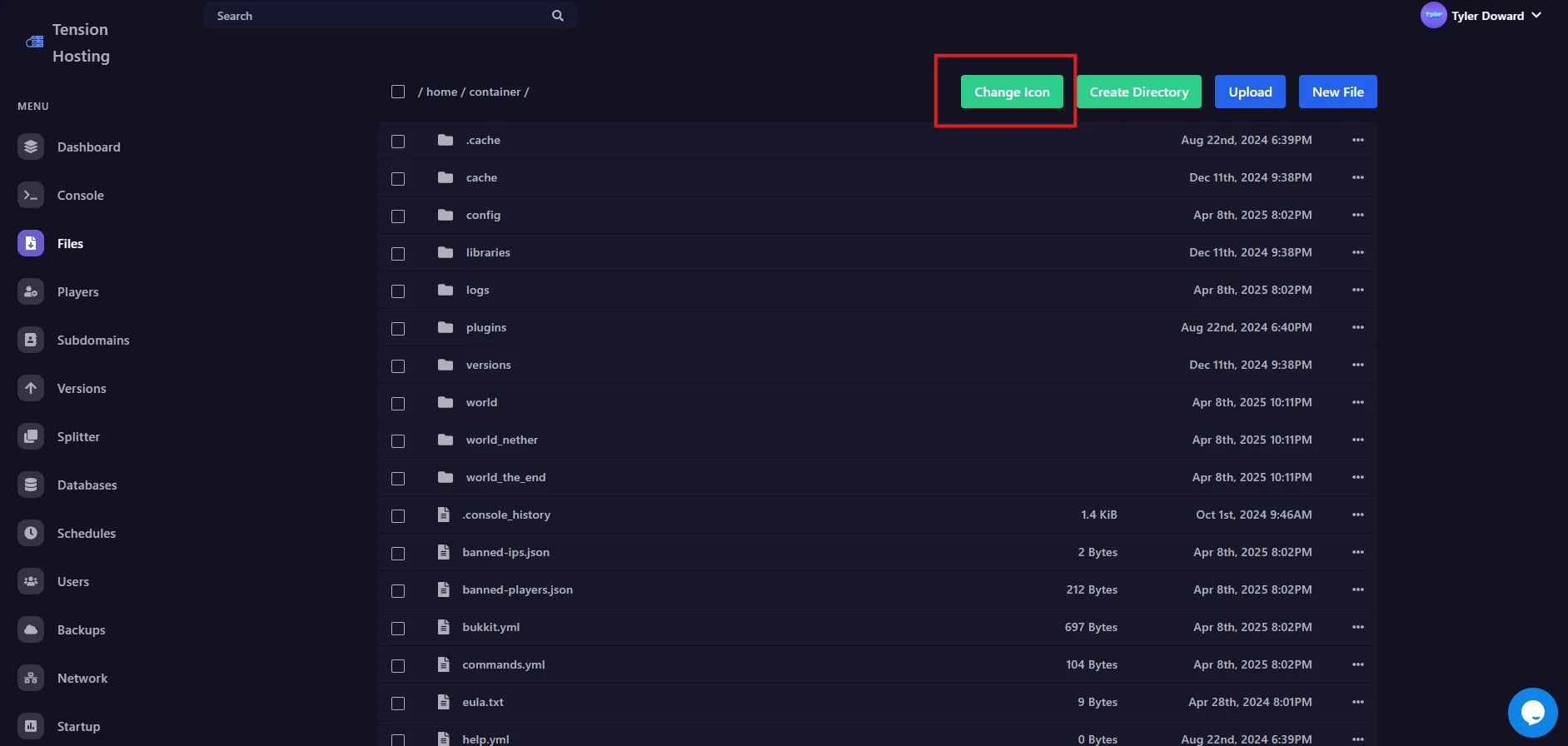
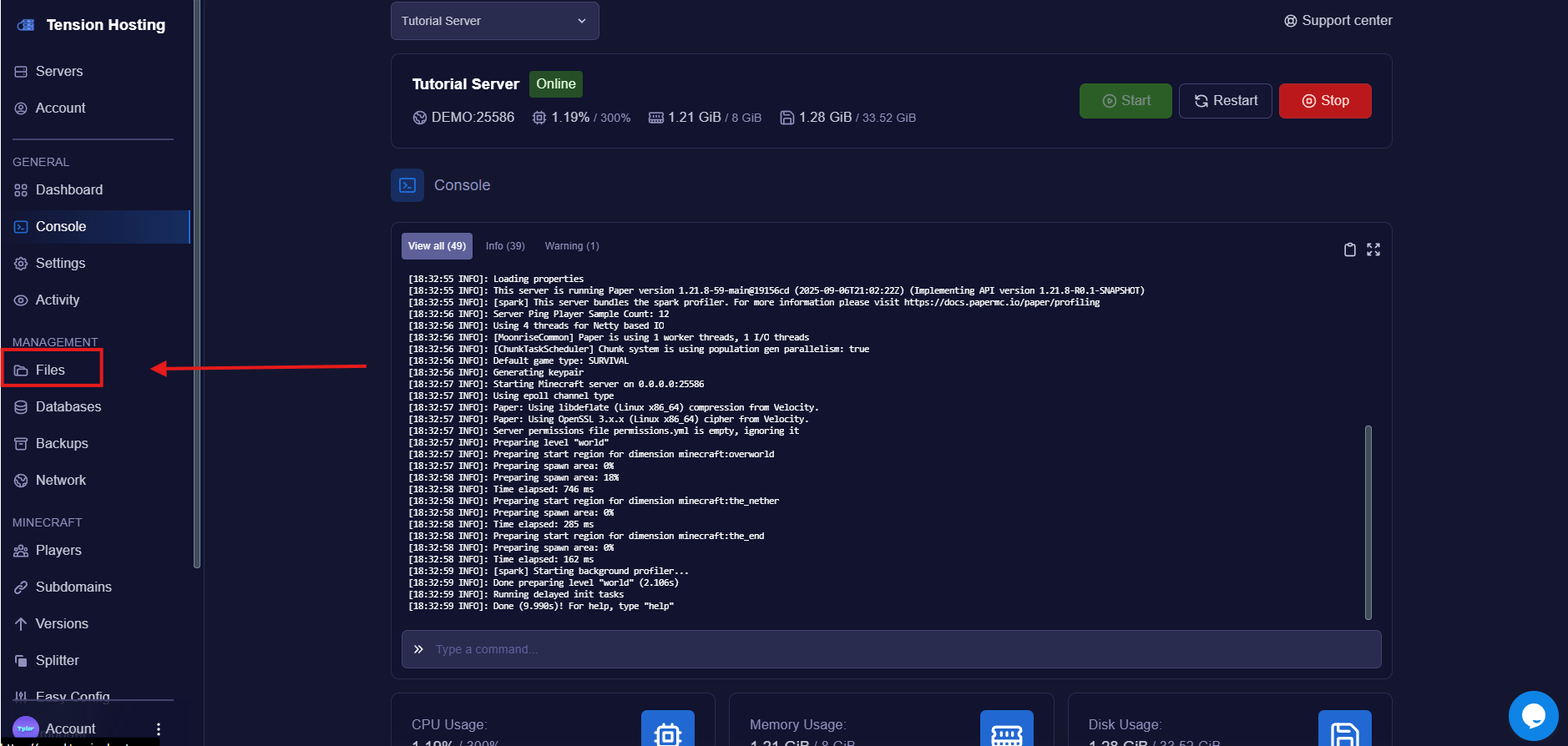 This brings up an area where you can upload the icon of your choice.
Normally a Minecraft server icon has to be an exact 64x64 PNG, but you can skip all that here. Upload any image and we resize it and make it compatible with Minecraft for you, no heavy lifting.
This brings up an area where you can upload the icon of your choice.
Normally a Minecraft server icon has to be an exact 64x64 PNG, but you can skip all that here. Upload any image and we resize it and make it compatible with Minecraft for you, no heavy lifting.
 Restart your server so the new icon gets picked up, then refresh your multiplayer list in game. There it is!
You are done! It was that simple.
While you're making your server look good in the list, style your MOTD to match. Our [MOTD guide](/pages/how-to/setting-motd) shows you how.
## Server icon FAQs
### What size does a Minecraft server icon need to be?
Minecraft requires exactly 64x64 pixels in PNG format. On the Tension panel you don't need to worry about it, upload any image and we convert it for you. If you're doing it manually anywhere else, it has to be exactly that.
### Why is my server icon not showing?
First, restart the server, the icon only updates after a restart. Then refresh your multiplayer server list. If you added the icon manually, check the file is named exactly **server-icon.png**, sits in the main server folder, and is a real 64x64 PNG.
### Can I upload the icon manually instead?
Yes. Make a 64x64 PNG, name it **server-icon.png**, and drop it in the main folder of your server through the Files tab or [over SFTP](/pages/how-to/using-sftp). The Change Icon button just does all of that for you.
### Can I have an animated server icon?
No. The Java server list only shows a single static PNG, so GIFs won't animate. If you want movement in the server list, that's what a well-styled MOTD is for.
## Still stuck?
If you need any more support, join our [Discord](https://discord.tensionhost.com) or open a [Ticket](https://billing.tensionhost.com/tickets/create)
Restart your server so the new icon gets picked up, then refresh your multiplayer list in game. There it is!
You are done! It was that simple.
While you're making your server look good in the list, style your MOTD to match. Our [MOTD guide](/pages/how-to/setting-motd) shows you how.
## Server icon FAQs
### What size does a Minecraft server icon need to be?
Minecraft requires exactly 64x64 pixels in PNG format. On the Tension panel you don't need to worry about it, upload any image and we convert it for you. If you're doing it manually anywhere else, it has to be exactly that.
### Why is my server icon not showing?
First, restart the server, the icon only updates after a restart. Then refresh your multiplayer server list. If you added the icon manually, check the file is named exactly **server-icon.png**, sits in the main server folder, and is a real 64x64 PNG.
### Can I upload the icon manually instead?
Yes. Make a 64x64 PNG, name it **server-icon.png**, and drop it in the main folder of your server through the Files tab or [over SFTP](/pages/how-to/using-sftp). The Change Icon button just does all of that for you.
### Can I have an animated server icon?
No. The Java server list only shows a single static PNG, so GIFs won't animate. If you want movement in the server list, that's what a well-styled MOTD is for.
## Still stuck?
If you need any more support, join our [Discord](https://discord.tensionhost.com) or open a [Ticket](https://billing.tensionhost.com/tickets/create)