> ## Documentation Index
> Fetch the complete documentation index at: https://docs.tensionhost.com/llms.txt
> Use this file to discover all available pages before exploring further.
# How to Install a Modpack on Your Minecraft Server
> This guide shows you how to install a modpack on your Minecraft server in one click using the Tension panel's modpack installer. Learn how to set up Modrinth modpacks, get your players connected with the matching pack, and how much RAM modded Minecraft server hosting needs.
Setting up a modded server used to mean downloading server files, matching loader versions and uploading everything by hand. On the Tension panel it's a couple of clicks. This guide shows you how to install a modpack on your server and get your friends playing on it.
## Installing a modpack
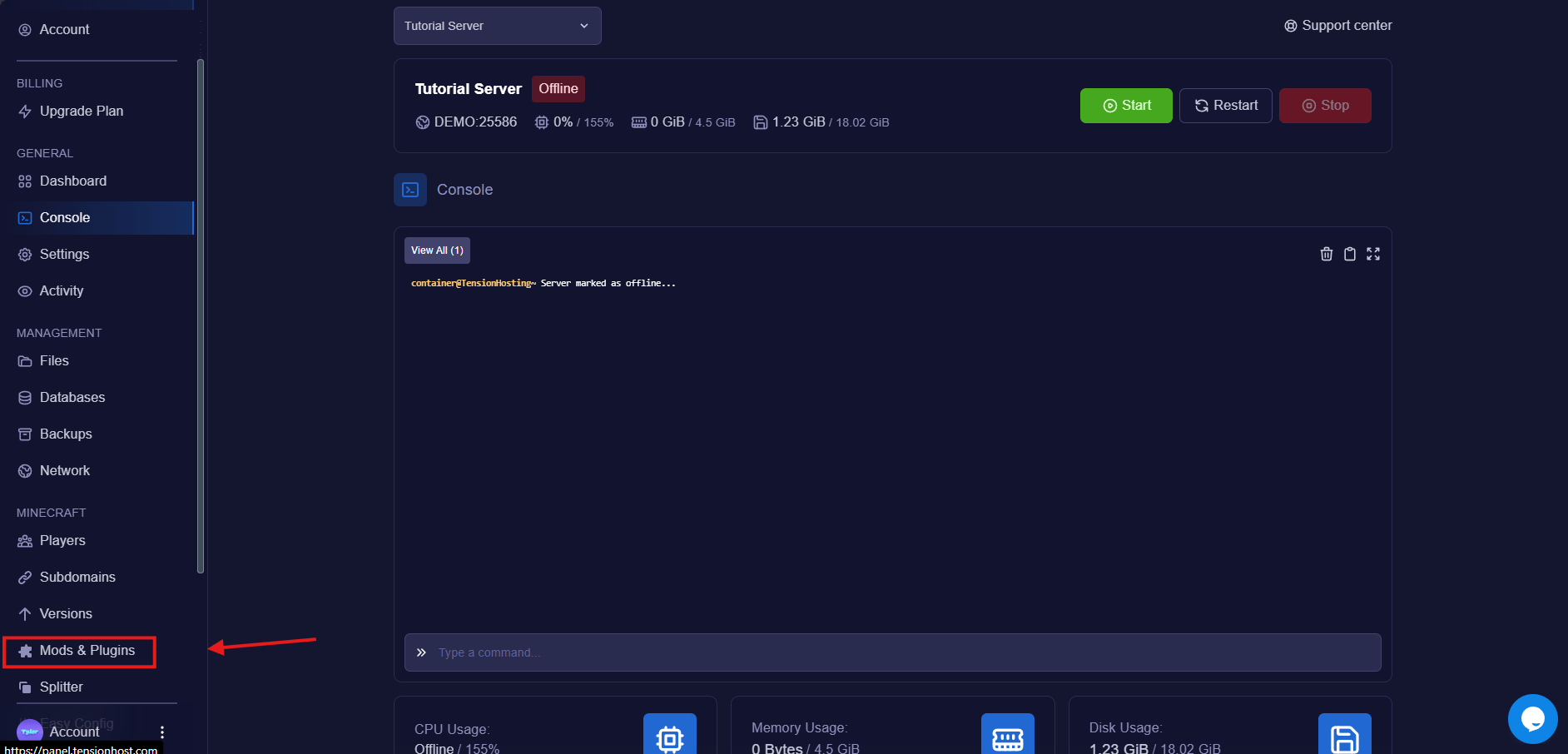
On your server, head to the " Mods & Plugins " tab and switch to modpacks.
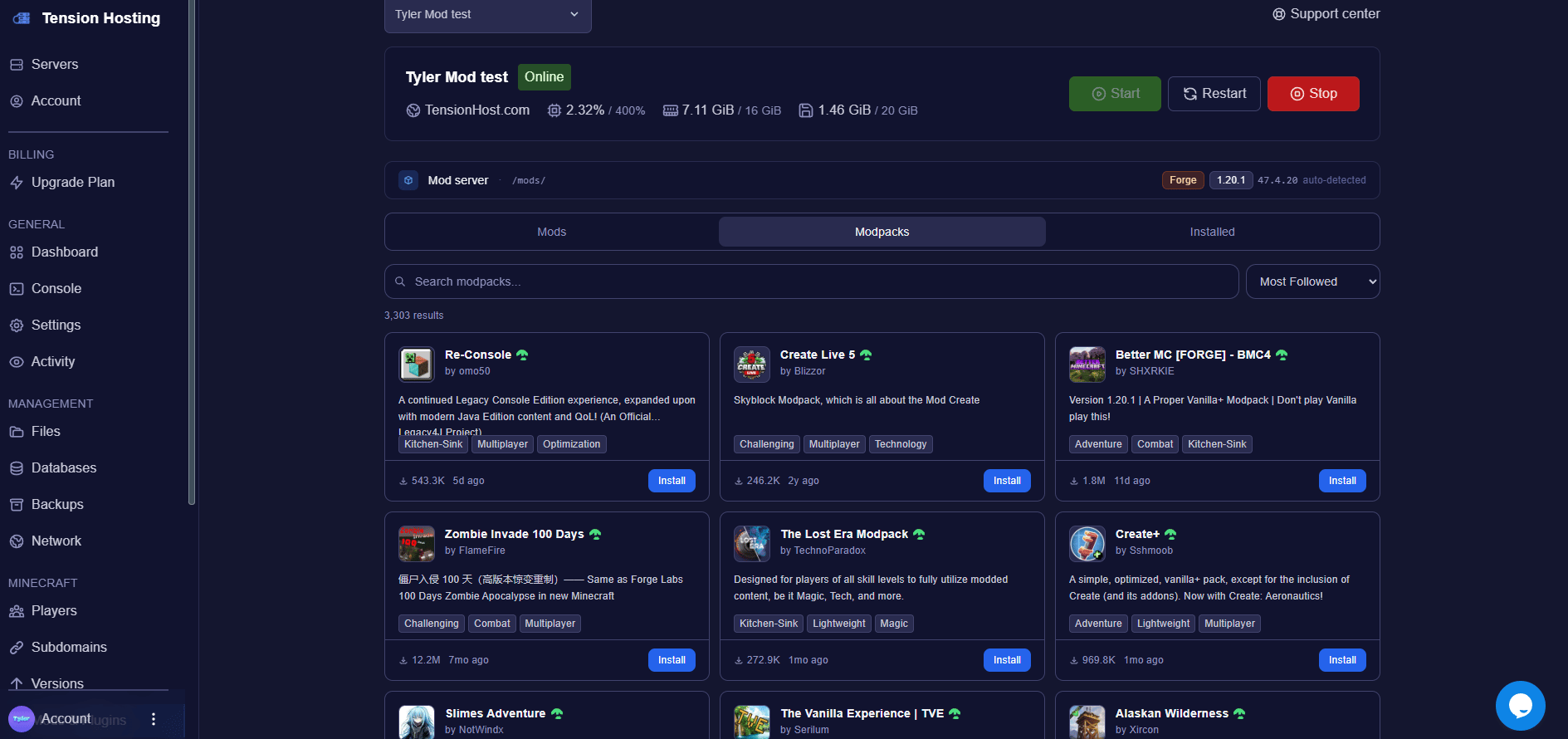
 Search for the pack you want and pick the version you're after. We pull packs straight from Modrinth, so everything popular is there.
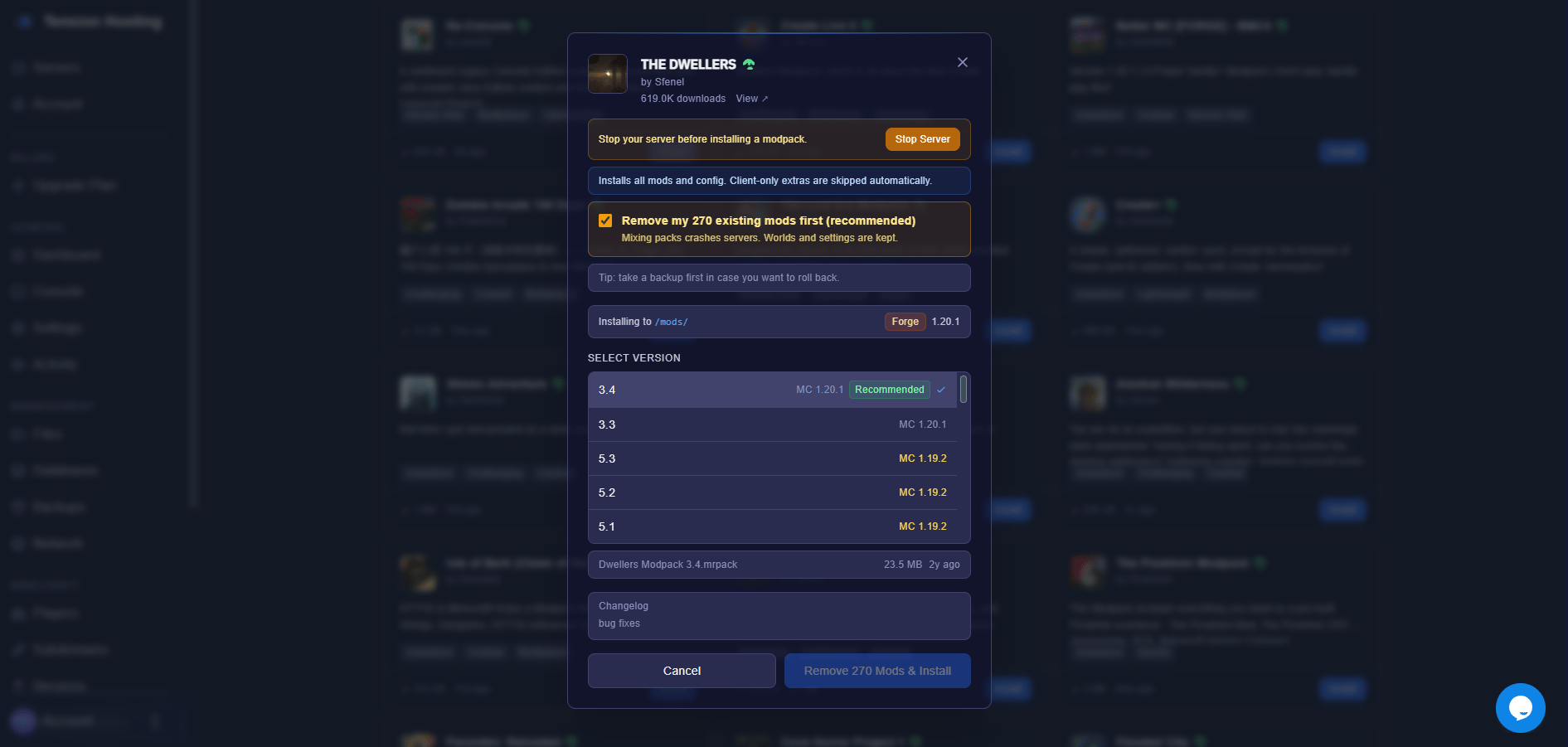
 Press install and let the panel do the work. It sets up the right loader, the right versions and all the server mods for you.
Installing a modpack replaces what's currently on the server, so if you have a world you care about, take a backup first from the Backups tab.
Press install and let the panel do the work. It sets up the right loader, the right versions and all the server mods for you.
Installing a modpack replaces what's currently on the server, so if you have a world you care about, take a backup first from the Backups tab.
 Here's the bit people miss: everyone joining needs the same modpack installed on their own game, same pack, same version. The easiest way is the Modrinth App, search the pack, install, play.
Start the server, give it a minute, modded servers take longer to boot the first time while the world generates, then jump in!
Big modpacks are hungry. If your server is on 4GB and you're installing a kitchen-sink pack, it will struggle. Check our [RAM guide](/pages/how-to/how-much-ram) for honest numbers, and [upgrade your plan](https://tensionhost.com) if you need to, your world and files stay put.
## Modpack FAQs
### Why do my players crash when joining?
Nine times out of ten they're on the wrong pack or the wrong version. Server and players must match exactly. Have them reinstall the pack at the same version the server is running.
### How much RAM do I need for a modpack server?
Small packs want 6-8GB, the big ones want 10GB or more. Our [RAM guide](/pages/how-to/how-much-ram) breaks it down properly.
### Can Bedrock players join a modded server?
No. Bedrock can't see modded blocks and items, so crossplay is really for vanilla and plugin servers. Our [crossplay guide](/pages/how-to/bedrock-crossplay) covers where it does work.
### Can I add extra mods to a modpack?
Yes, install them through the same Mods tab, or drop the jar files into the mods folder in the file area. Just remember your players need any client-side additions too.
### Why does my server crash on startup?
Some modpacks require dependencies that are not included in the pack itself. Read the crash error in the console, which should tell you what mods need installing for your modpack to work. If you need help with this, don't hesitate to contact support.
## Still stuck?
If you need any more support, join our [Discord](https://discord.tensionhost.com) or open a [Ticket](https://billing.tensionhost.com/tickets/create)
Here's the bit people miss: everyone joining needs the same modpack installed on their own game, same pack, same version. The easiest way is the Modrinth App, search the pack, install, play.
Start the server, give it a minute, modded servers take longer to boot the first time while the world generates, then jump in!
Big modpacks are hungry. If your server is on 4GB and you're installing a kitchen-sink pack, it will struggle. Check our [RAM guide](/pages/how-to/how-much-ram) for honest numbers, and [upgrade your plan](https://tensionhost.com) if you need to, your world and files stay put.
## Modpack FAQs
### Why do my players crash when joining?
Nine times out of ten they're on the wrong pack or the wrong version. Server and players must match exactly. Have them reinstall the pack at the same version the server is running.
### How much RAM do I need for a modpack server?
Small packs want 6-8GB, the big ones want 10GB or more. Our [RAM guide](/pages/how-to/how-much-ram) breaks it down properly.
### Can Bedrock players join a modded server?
No. Bedrock can't see modded blocks and items, so crossplay is really for vanilla and plugin servers. Our [crossplay guide](/pages/how-to/bedrock-crossplay) covers where it does work.
### Can I add extra mods to a modpack?
Yes, install them through the same Mods tab, or drop the jar files into the mods folder in the file area. Just remember your players need any client-side additions too.
### Why does my server crash on startup?
Some modpacks require dependencies that are not included in the pack itself. Read the crash error in the console, which should tell you what mods need installing for your modpack to work. If you need help with this, don't hesitate to contact support.
## Still stuck?
If you need any more support, join our [Discord](https://discord.tensionhost.com) or open a [Ticket](https://billing.tensionhost.com/tickets/create)