
Connecting with SFTP
Find your SFTP details
On your server, head to the ” Settings ” tab and look at the SFTP Details box. You need three things: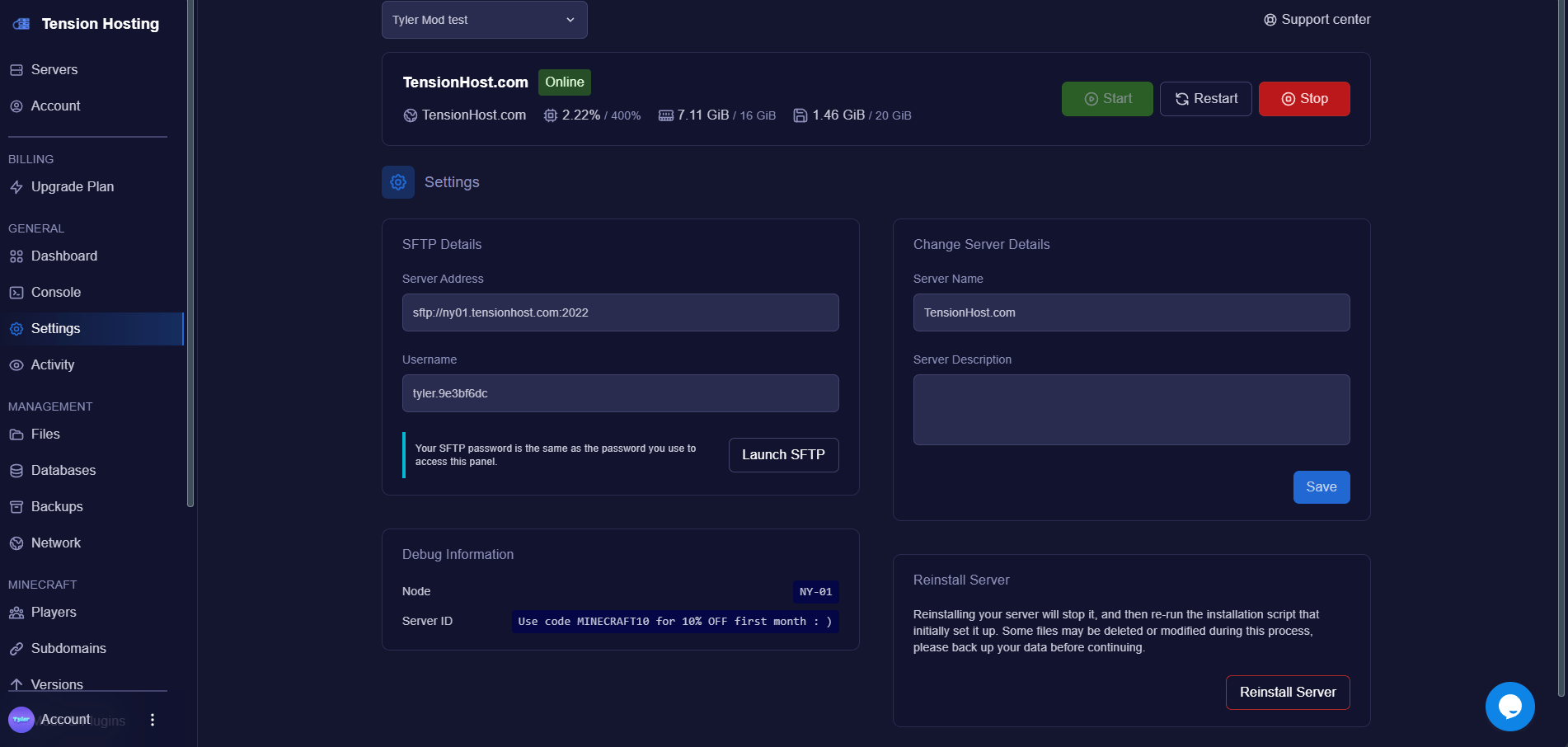
- Server Address, something like sftp://ny01.tensionhost.com:2022. The middle bit is the host, the number on the end is the port.
- Username, yours will look like name.abc123. Copy it exactly, the dot and letters matter.
- Password, this is the same password you use to log in to the panel.
Your address depends on which node your server runs on, so always copy what your own Settings tab shows rather than what you see in a screenshot.
Connect
Open WinSCP and fill in the login window:
- File protocol: SFTP
- Host name: your server address without the sftp:// bit, for example ny01.tensionhost.com yours will be in the settings tab.
- Port number: 2022
- User name: your SFTP username shown in settings tab
- Password: your panel password
Manage your files
The right side of WinSCP is your server, the same files you see in the Files tab. The left side is your computer. Drag files either way to upload or download. That’s it, you’re in.